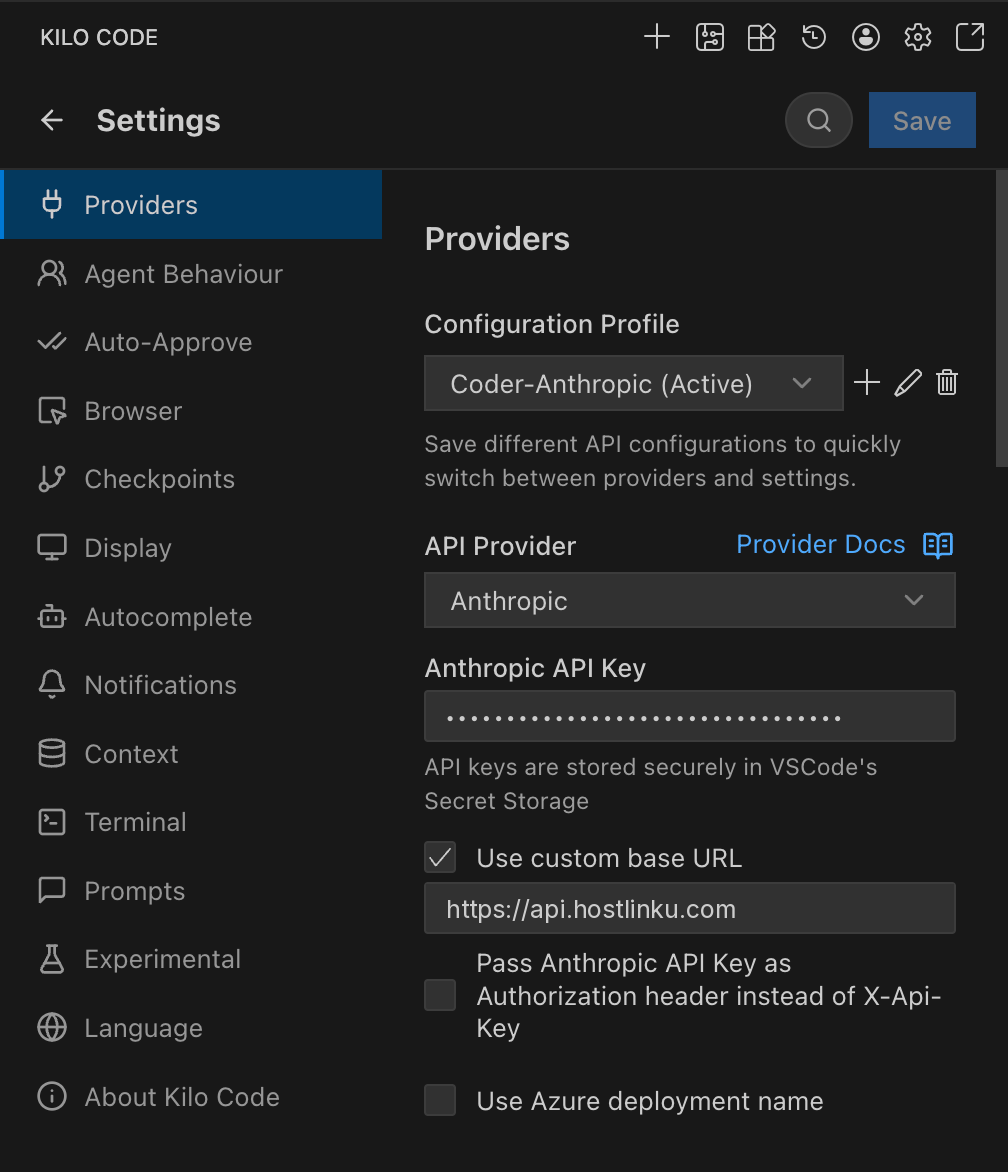
Kilo Code — a coding agent extension for VS Code and JetBrains (a fork of Cline/Roo Code) — saves provider settings per Configuration Profile. You can create a separate Hostlinku profile from other profiles and switch between them with a single click. Prerequisites: The Kilo Code extension must be installed, and you must have a Hostlinku API key (sk-…) from the console → API Keys.

Alternative: Anthropic

Select API Provider Anthropic, check Use custom base URL, enter https://api.hostlinku.com (without /v1), and paste your Hostlink API key into the Anthropic API Key field. The list of models is limited to Claude models recognized by Kilo Code—select the ones whose slugs match those in the Hostlinku catalog (e.g., claude-sonnet-4-6, claude-haiku-4-5). Kilo Code: provider Anthropic with custom base URL https://api.hostlinku.com

What You Need to Know

  • One profile per mode. Kilo Code can use different profiles for Architect and Code modes, and Debug. Example: Architect = claude-opus-4-6, Code = claude-sonnet-4-6.
  • Custom headers are not required. Hostlinku only needs an API key; leave the custom section blank headers.
  • Inline autocomplete Kilo Code uses a FIM endpoint that isn’t served by Hostlinku — leave it as is That feature is available in the default provider (see Overview).

Troubleshooting